Calciforge connects to Matrix through the Client-Server API v3
using HTTP long-polling (/sync). Long-polling means Calciforge keeps
asking the homeserver for new events, so no webhook endpoint or open firewall
port is required.
End-to-end encryption requires the SDK runtime. The default
warn/offmodes use the raw HTTP adapter, which receives plaintextm.textevents and sends plaintext replies plus native media events for artifacts. Rooms where E2EE is required must usematrix_e2ee = "require"or"experimental-sdk"in a build compiled with--features channel-matrix-e2eeand a persistent SDK crypto store.
Matrix user  ──→  homeserver  ──→  Calciforge (/sync long-poll)
                                          │
                                  identity resolution
                                  (allowed_users check)
                                  agent dispatch
                                          │
Matrix user  ←──  homeserver  ←──  Calciforge (PUT /send/m.room.message, media upload)
@calciforge-bot:example.com
works fine.curl -s -X POST 'https://matrix.example.com/_matrix/client/v3/login' \
-H 'Content-Type: application/json' \
-d '{
"type": "m.login.password",
"user": "@calciforge-bot:example.com",
"password": "botpassword"
}' | grep access_token
Copy the access_token value from the response and store it like a
password. Access tokens are not decorative boilerplate; they are the key to
the bot account.
!abc123def456:example.comallowed_usersinstall -m 600 /dev/null ~/.config/calciforge/secrets/matrix-token
printf '%s' 'syt_YOUR_ACCESS_TOKEN_HERE' > ~/.config/calciforge/secrets/matrix-token
Add to ~/.config/calciforge/config.toml:
[[channels]]
kind = "matrix"
enabled = true
homeserver = "https://matrix.example.com"
access_token_file = "~/.config/calciforge/secrets/matrix-token"
room_id = "!abc123def456:example.com"
allowed_users = ["@operator:example.com"]
# Optional policy gate; default is "warn".
matrix_e2ee = "warn"
| Field | Required | Description |
|---|---|---|
homeserver |
yes | Full URL of the Matrix homeserver |
access_token_file |
yes | Path to file containing the bot’s access token |
room_id |
yes | Internal room ID (starts with !) |
allowed_users |
yes | Matrix user IDs permitted to send commands; use ["*"] to allow all room members; empty list is rejected at startup |
matrix_e2ee |
no ("warn") |
"off" skips encrypted-room checks, "warn" keeps the raw HTTP fallback and warns on encrypted rooms, "require" fails closed unless the SDK E2EE runtime can run, and "experimental-sdk" opts into the same SDK runtime while it is still settling |
matrix_e2ee_store_path |
required for SDK E2EE | Persistent Matrix SDK state and crypto-store path for matrix_e2ee = "require" or "experimental-sdk" |
matrix_e2ee_store_passphrase_file |
no | Optional file containing the Matrix SDK store passphrase |
ui_mode |
no | "auto" by default; set "text" to disable channel-native UI experiments and keep text-only replies for bridged clients |
scan_messages |
no (false) |
Enable inbound adversarial content scanning |
allow_chat_secret_set |
no (false) |
Allow !secret set / !secure set via Matrix (not recommended) |
The alias id is the full Matrix user ID including homeserver:
[[identities]]
id = "operator"
display_name = "Alice"
role = "admin"
aliases = [
    { channel = "matrix", id = "@alice:example.com" },
]

[[routing]]
identity = "operator"
default_agent = "primary-agent"
allowed_agents = ["primary-agent"]
Messages from Matrix users not in allowed_users are ignored before identity resolution.
Messages from allowed_users members with no matching identity alias are also dropped.
Invite @calciforge-bot:example.com to the room. Calciforge will auto-accept the invite
if the inviting user’s Matrix ID is in allowed_users.
calciforge doctor   # validates config
calciforge          # start; send a message in the room
The bot responds to commands (!help, !ping, !agent list,
!agent switch <agent>, !model list, !secret input NAME, etc.) and routes
other messages to the default agent for the sender’s identity. Legacy shortcuts
such as !agents, !switch, and !secure remain supported.
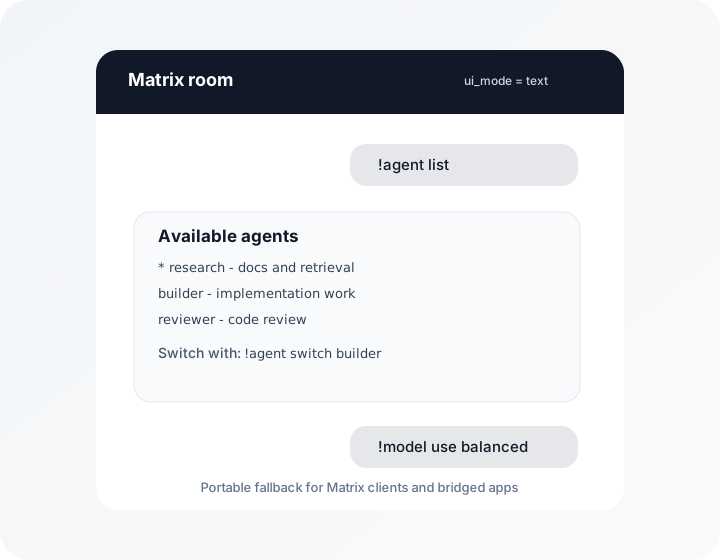
Matrix support currently treats text commands as the portable interface. Agent
choices, model choices, session lists, and approval decisions all render through
the shared choice model, but the Matrix adapter sends the text fallback today.
Some Matrix clients and bridges expose buttons or polls differently, and
bridges such as Beeper may not support the downstream app’s native controls.
Use ui_mode = "text" in [[channels]] to force plain text for a channel;
ui_mode = "auto" is reserved for channel-native affordances once the Matrix
adapter can expose them without breaking bridged clients. Plain text is not as
flashy, but it behaves predictably across the moving castle of Matrix clients.
You can still use a richer channel, such as Telegram, as the Calciforge control surface for agent/model selection while keeping Matrix as the main chat room. Selections are keyed by Calciforge identity and apply across that operator’s channels.
E2EE support uses the Matrix Rust SDK crypto stack when compiled with
--features channel-matrix-e2ee. The bot restores the access-token session
using /account/whoami, persists SDK state in matrix_e2ee_store_path, skips
backlog with an initial SDK sync, then listens for decrypted text/notice events
in the configured encrypted room. If the SDK path is unavailable, require
fails closed instead of silently using the raw HTTP runtime.
Agent replies that include artifacts are uploaded through the Matrix media API
and sent as native m.image, m.audio, m.video, or m.file events. If media
upload fails, Calciforge sends the safe text fallback with artifact names and
sizes instead of exposing local artifact paths.
matrix_e2ee = "require" is the production policy gate: the configured room
must advertise m.room.encryption, the build must include
channel-matrix-e2ee, and matrix_e2ee_store_path must be set. When those
conditions hold, Calciforge uses the SDK runtime for decrypted inbound text and
encrypted outbound text replies. matrix_e2ee = "experimental-sdk" uses the
same runtime but keeps an explicit opt-in name while broader Matrix SDK coverage
is still being hardened.
The raw HTTP adapter remains the fallback for unencrypted Matrix rooms and for builds that do not include the SDK feature. Native encrypted media upload and SDK invite handling are not complete yet; SDK mode sends artifact responses as encrypted text fallback and currently expects the bot to already be joined to the configured room.